
- Daily check-in calls or texts at a set time, with a plan if they don't answer.
- A local network: a neighbor, friend or faith community member who checks in.
- Video calls on a simple tablet or smart display.
- Smart home tools like video doorbells, motion sensors and smart plugs, with your parent's agreement.
- Medical alert systems with a help button and, on some, fall detection.
- Simple tools your parent carries, like a phone and a personal alarm.
In an emergency, call 911. If you can't reach your parent and are worried, ask a neighbor to check or call the local police non-emergency line to request a welfare check.
When you live an hour, a day's drive or a plane ride away from an aging parent, every unanswered phone call can set off a wave of worry. Did they fall? Are they sick? Did they forget to charge the phone? Even if you live nearby, you can't be there all the time.
The good news is that there are many ways to stay informed and help your parent stay safe, without hovering or installing cameras in every room. This guide covers low-tech and high-tech options, how to respect privacy, and how to build a check-in plan that works for both of you.
Why is it worth having a check-in plan?
Many older adults live alone, and many prefer it. The National Institute on Aging notes that most older adults want to stay in their own homes as they age, and that planning for safety and support helps make that possible. A reliable check-in plan means that if something happens, like a fall or an illness, someone will notice quickly. That matters: the CDC reports that more than one in four older adults falls each year, and getting help fast after a fall can make a big difference.
How do you set up daily check-in calls?
- Pick a set time each day, like 9 a.m. or after dinner, so a missed call stands out.
- Rotate among siblings or family so it doesn't fall on one person.
- Agree on a backup plan: if your parent doesn't answer after two tries within an hour, call the neighbor; if the neighbor can't reach them, ask for a welfare check.
- Use a simple text ("Good morning!") for days when a call isn't possible.
- Listen for changes: confusion, slurred speech, unusual tiredness or not eating.
Some phone services and community programs offer automated daily check-in calls for seniors who live alone. The Eldercare Locator can help you find local services.
Who can be your eyes and ears nearby?
Technology helps, but people notice things devices don't. Build a small local network: a trusted neighbor, a friend, someone from their place of worship, a hairdresser or a regular delivery person. Share your number with them and ask them to call if they notice something off: mail piling up, curtains closed all day, a car that hasn't moved. Many communities have friendly visitor programs or senior center check-ins. A paid caregiver or companion for a few hours a week also gives regular, in-person eyes on how things are going.
How do video calls help?
Video lets you see how your parent looks and moves, and how the home looks, in a way a phone call doesn't. It also eases loneliness. Choose the simplest option for your parent: a tablet set up with one large video call button, or a smart display that can answer calls from approved family automatically. Set it up during a visit, write simple instructions, and keep it plugged in. Regular video calls also help with loneliness, which affects health as much as mood.
Which smart home tools are useful?
| Tool | What it does | Privacy level |
|---|---|---|
| Video doorbell | See visitors and deliveries; your parent can talk without opening the door | Outside only |
| Motion sensors | Show activity patterns (e.g. kitchen in the morning) without cameras | Low intrusion |
| Smart plugs | Show if the kettle or TV was turned on; turn off appliances remotely | Low intrusion |
| Smart thermostat | Check and adjust temperature remotely in heat or cold | Low intrusion |
| Door sensors | Alert if a door opens at unusual times | Low intrusion |
| Indoor cameras | Live view of rooms | High intrusion; only with clear consent |
Start with the least intrusive tools, and always involve your parent in the decision. Many older adults accept a motion sensor in the kitchen far more easily than a camera in the living room.
How do you respect your parent's privacy?
Checking in should support your parent's independence, not take it away. Talk openly about what you're worried about and what they're comfortable with. Ask them which tools they'd accept, agree on who can see what, and revisit the plan as needs change. Frame it as peace of mind for you and the family, not as surveillance. If they say no to something, look for a gentler alternative. See when an aging parent refuses help for tips on these conversations.
Should your parent have a medical alert system?
A medical alert system with a wearable button connects your parent to a monitoring center or family with one press, and some models detect falls automatically. They're worth considering if your parent has fallen before, has health conditions that could cause sudden problems, or lives alone with limited mobility. Most charge a monthly fee. Compare options in our guide to medical alert options without a monthly fee, and see personal safety alarms vs medical alerts for the difference.

What simple tool can your parent carry for help nearby?
Not every situation needs a monitoring service. Sometimes your parent just needs a fast way to get the attention of a neighbor, a passerby or someone else in the house: in the garden, on a walk, in a parking lot, or if they feel unsafe at the door.
HaloSiren is a small keychain personal safety alarm. Pulling the pin sets off a 130 dB siren and a flashing LED light. It's rechargeable, needs no app and has no monthly fee, and it clips to keys, a bag or a belt loop. To be clear: HaloSiren is a local alarm. It does not call 911, does not notify you or other family members, and does not detect falls. It works well as one layer of a check-in plan, alongside a phone and regular calls. It costs $29.99, or 5 for $89.97 (about $17.99 each), with a 90-day guarantee. Read our HaloSiren review, where we rate it 4.4/5.
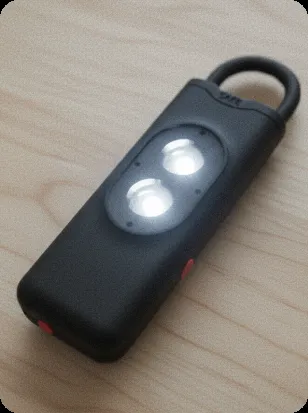
A simple way to get attention nearby
HaloSiren keychain alarm: 130 dB siren and flashing light, rechargeable, no app and no monthly fee. A local alarm that works alongside a phone. $29.99, or 5 for $89.97, 90-day guarantee.
Check today's price →$29.99, or 5 for $89.97 · 90-day guarantee
What information should you keep on hand?
- Your parent's doctors, pharmacy and medication list.
- Contact information for neighbors and local friends.
- Who has a spare key, or a lockbox code.
- Insurance and Medicare details.
- The local police non-emergency number for welfare checks.
- Any legal documents, like healthcare power of attorney.
Keep a copy on your phone and a printed copy on your parent's fridge, so first responders and family can find it quickly.
What signs should prompt a visit or more help?
Pay attention to changes you notice in calls and visits: unopened mail, spoiled food, weight loss, missed medications, new bruises, confusion, a messy home from someone who used to be tidy, or fewer social activities. These can signal that your parent needs more support. See signs an elderly parent needs help and long-distance caregiving.
What does a good remote check-in plan look like?
- A daily call or text at a set time, shared among family.
- A named local contact with a key.
- A clear backup plan for missed check-ins.
- A phone and an alarm within reach in key rooms.
- Low-intrusion smart tools, if your parent agrees.
- A medical alert system if health or fall risk calls for it.
- Regular visits, in person, as often as possible.
How do you notice changes in routine from far away?
One of the most useful things remote check-ins can do is reveal changes in your parent's daily rhythm. Over a few weeks, you'll learn what's normal: when they usually wake up, when they eat, when they go for a walk or watch their favorite show. A change in that rhythm, like sleeping much later, skipping meals or not leaving the house for days, is often an early sign of illness, low mood or a new problem with mobility. Keep a simple note on your phone of anything unusual you hear on calls, and share it with siblings and the doctor if a pattern appears. Catching small changes early often prevents a bigger crisis later.
What if your parent isn't good with technology?
Choose devices that need no setup or daily effort from your parent. A tablet locked to one video app, a smart display that answers family calls automatically, a phone with large buttons and photos for speed dial, and plug-in sensors that run on their own are all good options. Set everything up during a visit, label buttons clearly and test with a call before you leave. Ask a local relative or neighbor to help if something stops working. And never let technology replace human contact; it should add to it.
The bottom line
Checking on an elderly parent remotely works best with layers: daily calls with a backup plan, a local network of people, simple video calls, low-intrusion smart tools with your parent's consent, and the right alert device for their needs. Respect their privacy and independence, and adjust the plan as things change.
For a simple alarm your parent can carry to get attention nearby, our pick is HaloSiren. Check today's HaloSiren price.
Sources
- National Institute on Aging. Aging in Place: Growing Older at Home.
- Centers for Disease Control and Prevention. Older Adult Falls: Facts and Stats.
- Eldercare Locator, U.S. Administration for Community Living. Eldercare Locator.
- Official HaloSiren product page, checked October 2026.
Frequently asked questions
How can I check on my elderly parent from far away?
Combine daily check-in calls at a set time, a trusted local neighbor or friend, video calls, low-intrusion smart tools with your parent's consent and, if needed, a medical alert system.
What should I do if my elderly parent doesn't answer the phone?
Follow your backup plan: try again, call the local contact, and if no one can reach them, call the police non-emergency line for a welfare check. Call 911 in an emergency.
Are cameras a good way to monitor an elderly parent?
Only with clear consent. Many parents prefer less intrusive tools like motion sensors, smart plugs or a video doorbell.
What is the best technology for checking on seniors?
The simplest your parent will actually use: a tablet or smart display for video calls, motion sensors, a video doorbell and a medical alert if health requires it.
Does HaloSiren notify family?
No. HaloSiren is a local 130 dB siren with a flashing light that draws attention from people nearby. It doesn't call 911 or family and doesn't detect falls.
What signs mean my parent needs more help?
Unopened mail, spoiled food, weight loss, missed medications, bruises, confusion, a messier home or pulling away from social activities.

Laura Bennett
Laura Bennett is the pen name of the Aging Parents at Home editorial team at Iqueda Media LLC. We write for adult children who want to help their aging parents stay safe and independent at home. The team researches daily-living and safety products, reads the official guidance from public health and safety organizations, and checks prices, policies and buyer feedback. We are not doctors, nurses or physical therapists. Her guides are built on official public health and safety guidance, manufacturer information, checkout and return policies, and buyer feedback, and are updated when offers change. More about Laura.