
When a parent starts living alone or walking less steadily, many families look for a way to make sure they can get help. Two very different products come up: keychain personal alarms and medical alert systems. They're often confused, but they do different jobs.
In this guide we explain what personal safety alarms do, how they differ from medical alert systems, who benefits most, what features to look for and how to use one well.
What is a personal safety alarm?
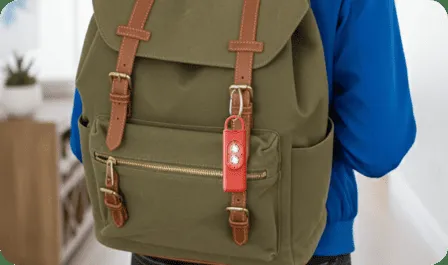
A personal safety alarm is a pocket-size device, usually clipped to keys or a bag. When you pull a pin or press a button, it sounds a piercing siren, often around 120 to 130 dB, and many models flash a bright strobe light. The goal is to attract attention from people nearby and to startle or deter someone who is threatening you.
It works on its own, with no phone, signal, app or subscription.
Personal alarm vs medical alert system: what's the difference?
| Personal safety alarm | Medical alert system | |
|---|---|---|
| What it does | Loud siren (and light) to attract people nearby | Connects to a monitoring center or family |
| Calls for help remotely | No | Yes |
| Fall detection | No | Available on many models |
| Monthly fee | None | Usually yes |
| Setup | None | Activation, sometimes base station or cellular plan |
| Price | About $20 to $30 | Device plus monthly subscription |
| Best for | Everyday safety, walks, yard, feeling unsafe | High fall risk, serious health conditions, living far from help |
The two aren't competitors. A medical alert system is the right tool for a parent at high risk who might not be able to call for help. A personal alarm is a simple, no-fee tool for everyday situations. Many families give a parent both.
Who benefits from a personal safety alarm?
- Parents who walk alone in the neighborhood, parks or parking lots.
- Parents who garden or do yard work, where a neighbor could hear.
- Parents who live alone and want a simple way to get attention.
- Parents who feel uneasy answering the door or using public transport.
- Caregivers who want a parent to be able to call them from another room.
The National Institute on Aging lists home safety features and help in case of a fall or other emergency among the supports that help older adults stay in their homes. A personal alarm is one small, affordable piece of that.
Can a personal alarm help after a fall?
It can, if the person can reach it and pull the pin, and if someone is close enough to hear. That's why it helps to keep it on a lanyard, belt loop or nightstand rather than in a drawer. But it doesn't detect falls or call anyone automatically. For parents with a high fall risk, the CDC notes that falling once doubles the chance of falling again, so talk with their doctor about a fall-risk assessment, and consider a medical alert system with fall detection.
What should you look for in a personal safety alarm?
- Loudness: around 120 to 130 dB.
- Light: a bright strobe helps in the dark and draws more attention.
- Easy activation: a pull-pin is simple even with arthritis or under stress.
- Easy to stop: push the pin back in.
- Rechargeable battery with long standby time.
- Water resistance for rain and snow.
- Size and attachment: light enough for keys, with a sturdy clip.
- Guarantee: a long return window to try it out.
Which personal alarm do we recommend?
HaloSiren ticks every box on that list. According to HaloSiren:
- A 130 dB siren, loud enough to be heard from a long distance.
- A bright LED strobe that flashes with the siren.
- Pull-pin activation designed for quick use under stress.
- Rechargeable, with up to 12 months of standby and several hours of continuous alarm.
- IPX7 water resistance.
- No app and no monthly fee.
It costs $29.99, or about $17.99 each in the buy-3-get-2-free pack, with a 90-day money-back guarantee. Read the full HaloSiren review.
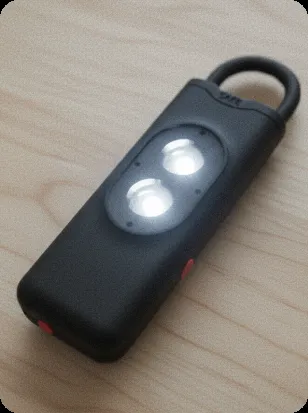
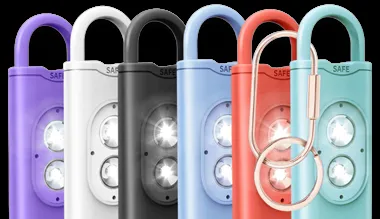
Our pick: the HaloSiren Personal Safety Alarm
Keychain alarm with a 130 dB siren and flashing LED light. Pull the pin and people nearby hear it. Rechargeable, no app, no monthly fee.
Check today's price →$29.99, or 5 for $89.97 · 90-day guarantee
How do you help a parent use one well?
- Practice together: pull the pin, hear the sound, put it back.
- Choose a spot where it's always within reach: keys, a lanyard, a walker or cane, the nightstand.
- Tell neighbors what the sound means and ask them to check if they hear it.
- Charge it regularly and test it every few months.
- Combine it with a phone within reach and regular check-in calls.
What other tools help a parent stay safe?
- A cane with a light and alarm, like the Ready Walker, for walking support. See our Ready Walker review.
- Night lights on the path to the bathroom.
- Grab bars and handrails; see our fall prevention guide.
- A cell phone with emergency contacts and large buttons.
- First aid knowledge for the family; see what to do if someone is choking.
How do you bring it up without worrying them?
Frame it as independence: "This way you can keep taking your walks, and I'll worry less." Give it as a practical gift, show how simple it is, and let them pick the color. Many parents who resist "safety gadgets" are happy to carry something small that looks like a keychain.
Which personal alarm myths can you ignore?
- "It calls the police." No, it makes noise and light locally.
- "It's only for young women." It's useful for anyone who walks alone, including older adults.
- "It's complicated." A good one has a single pull-pin.
- "It replaces a medical alert system." Not for high-risk parents; they do different jobs.
What should parents who live alone know?
- Set up daily check-ins: a morning text or call at the same time each day.
- Share a key with a trusted neighbor.
- Keep a phone within reach, including at meals and in the bathroom.
- Keep the alarm on a lanyard or nightstand, not in a drawer.
- Make the home safer: lighting, grab bars and no loose rugs.
- Consider a medical alert system if they have a high fall risk or serious health conditions.
How loud is 130 dB?
Decibels measure sound level, and every 10 dB is a big jump in loudness. A normal conversation is around 60 dB; 130 dB is extremely loud, which is why personal alarms are effective at attracting attention. It also means you shouldn't hold one right next to your ear. Test it briefly at arm's length.
How can caregivers use one too?
Caregivers sometimes use a personal alarm as a simple "call button" around the house: a parent pulls the pin, and the caregiver hears it from another room or the yard. It's not a substitute for monitoring when a parent needs closer supervision, but for many families it's a quick, inexpensive way to stay within reach.
Should you attach it to a cane or walker?
That's a smart place for it: the cane or walker goes everywhere the parent does. Some canes, like the Ready Walker, already have a built-in alarm and light. If your parent's cane doesn't, clipping a keychain alarm to the handle keeps it within reach on every walk.
What should you check before you buy?
- Is it loud enough (around 120 to 130 dB)?
- Can your parent activate it easily with their hands?
- Is it easy to turn off?
- Is it rechargeable, and how long does the charge last?
- Does it have a long return window?
What should you do in the first week?
Charge the alarm fully, practice pulling the pin together and agree on where it will live. Introduce it to neighbors and other family members, so they recognize the sound. Then check in after a week: is it on their keys or nightstand, or in a drawer? Small adjustments in the first week make it far more likely the alarm will be within reach when it matters.
How much do personal alarms cost?
Most good keychain alarms cost between $15 and $30, with no ongoing fees. HaloSiren is $29.99 for one, or about $17.99 each in the 5-pack. Compared with a monthly medical alert subscription, it's an inexpensive way to add a layer of everyday safety, and many families buy several so every family member has one.
Since there's no subscription, the only ongoing cost is a few minutes to recharge it now and then, which makes it one of the simplest safety tools to keep up with.
Pair it with daily check-ins and a safer home, and it becomes part of a simple, affordable safety routine.
Peace of mind doesn't have to be complicated or expensive.
Related guides: medical alerts without a monthly fee and walking safety for seniors.
What types of personal alarms are there?
| Type | What it does | Monthly fee | Best for |
|---|---|---|---|
| Keychain siren alarm | Loud siren and light to attract people nearby | None | Walks, errands, yard, calling household members |
| Monitored medical alert | Button connects to a call center | Usually yes | High fall risk, living alone |
| Medical alert with fall detection | Can detect some falls and call automatically | Usually yes | Frequent fallers |
| Smartwatch | Calls, texts, sometimes fall detection | Sometimes (cellular) | Tech-comfortable parents |
| Caregiver pager or doorbell | Button rings a receiver in the house | None | Living with family |
See personal alarm vs medical alert for a deeper comparison.
What about nighttime and the bathroom?
Many falls happen at night or in the bathroom. Keep an alarm on the nightstand and consider one in the bathroom. Add night lights and grab bars too. See nighttime fall prevention and bathroom safety.
Which devices actually alert family members?
- Monitored medical alert systems: a pendant or wristband connects to a call center that can contact family or 911. Some include fall detection. Usually a monthly fee.
- Smartwatches with emergency SOS: pressing and holding a button can call emergency services and text emergency contacts with location. Requires a compatible phone or cellular plan.
- Smartphone emergency SOS: most phones can call 911 and notify emergency contacts with a button sequence. Free, but the phone must be on hand.
- Simple cellular "help button" devices: call preset contacts at a press.
We compare the trade-offs in personal alarm vs medical alert.
How do you set up phone emergency contacts?
- Open the phone's health or emergency settings.
- Add emergency contacts (you, siblings, a trusted neighbor).
- Turn on emergency SOS and location sharing for those contacts.
- Practice the button sequence with your parent, without placing a real call.
- Write the steps on a card and keep it by the phone charger.
The bottom line
A personal safety alarm is a simple, affordable, no-fee way for a parent to attract attention from people nearby, on walks, in the yard or at home. It's not a medical alert system and won't call 911 or detect falls, so higher-risk parents may need both. For everyday peace of mind, it's one of the easiest safety gifts you can give.
Our pick is HaloSiren: 130 dB, LED strobe, one pull, no app or fees. Check today's HaloSiren price.
Sources
- National Institute on Aging. Aging in Place: Growing Older at Home.
- Centers for Disease Control and Prevention. Older Adult Falls: Facts and Stats.
- Official HaloSiren product page and FAQ, checked October 2026.
Frequently asked questions
What is a personal safety alarm?
A small device, usually on a keychain, that makes a very loud siren (often around 130 dB) and sometimes flashes a light when you pull a pin or press a button, to attract help from people nearby.
Is a personal alarm the same as a medical alert system?
No. Medical alert systems connect to a monitoring center or family by phone, often for a monthly fee. A personal alarm only makes noise and light locally, with no subscription.
Who should carry a personal safety alarm?
Older adults who walk alone, garden, take public transport, live alone or feel uneasy in parking lots, and caregivers who want a simple way for a parent to call attention nearby.
Can a personal alarm help after a fall?
It can attract neighbors or family within earshot if the person can reach and activate it. It doesn't detect falls or call for help automatically.
How loud should a personal alarm be?
Look for around 120 to 130 dB. HaloSiren is rated at 130 dB with a flashing LED strobe.
What is a good personal alarm for seniors?
Our pick is HaloSiren: 130 dB, LED strobe, pull-pin activation, rechargeable, no app or monthly fee, from about $17.99 each in bundles.

Laura Bennett
Laura Bennett is the pen name of the Aging Parents at Home editorial team at Iqueda Media LLC. We write for adult children who want to help their aging parents stay safe and independent at home. The team researches daily-living and safety products, reads the official guidance from public health and safety organizations, and checks prices, policies and buyer feedback. We are not doctors, nurses or physical therapists. Her guides are built on official public health and safety guidance, manufacturer information, checkout and return policies, and buyer feedback, and are updated when offers change. More about Laura.